
MangaMuse:AceToon Lite & Comic
FairfaxAngelicComics
4.460.00 Reviews
- Version
- 1.7.16
- Installs
- 500.00K
- Age Rating
- Teen
Screenshots

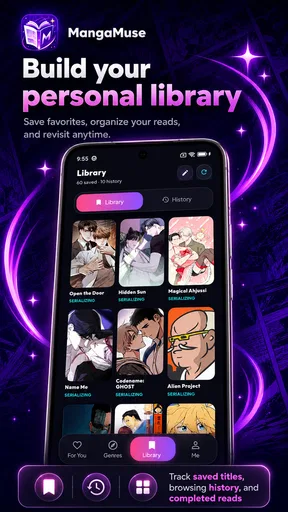

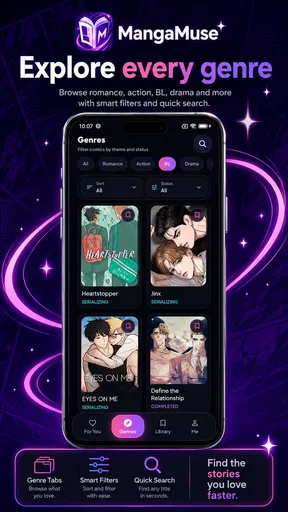
Our Review of MangaMuse:AceToon Lite & Comic
 Analysis by Appyee
I spent time with MangaMuse:AceToon Lite & Comic as a lightweight way to browse manga and webtoons, and its most noticeable idea is simple: swiping becomes the main tool for deciding what deserves a second look. Instead of opening every title, reading several descriptions, and building a reading list manually, I could move through recommendations, keep the ones that caught my attention, and return to those favorites later. That small change makes the app feel closer to a visual discovery tool than a traditional digital bookshelf.
That distinction matters because comic apps often become cluttered once a reader has more than a few series in mind. MangaMuse, developed by FairfaxAngelic, focuses on reducing the hesitation between seeing a cover and deciding whether it belongs in your personal queue. It is a free Comics app with a Teen content rating, and I found its appeal strongest during short browsing sessions rather than long, carefully planned reading marathons.
The app has a 4.0 average from around 2.5 thousand ratings, with more than 100 thousand installs. Those figures suggest that it has found a real audience without making it feel like an overcrowded mainstream platform. It is currently listed as version 1.7.1 and supports Android 7.0 or later, so the entry barrier is fairly low for people using older compatible phones.
Why the swipe-to-save idea works
The central capability is not merely swiping for decoration. It changes the way I make decisions about unfamiliar comics. When I browse in a conventional catalog, I tend to open too many pages, compare titles, forget why I opened them, and eventually leave without saving anything. A swipe-based flow gives each title a quick moment of attention. If the artwork or premise interests me, I save it; if not, I move on before the catalog becomes a chore.
I especially liked this approach when I did not have a particular series in mind. Searching is better when I already know the title or creator I want. Discovery is different: I want to notice patterns, moods, and visual styles that I would not have searched for directly. MangaMuse is built around that second situation. Its value comes from making casual browsing feel purposeful without demanding a long setup.
The dark theme supports the same goal. It gives the interface a quieter appearance, which is useful when I am browsing in the evening or in a dim room. More importantly, the darker presentation keeps the screen from feeling as visually aggressive as a bright catalog packed with covers. I would not call the theme a revolutionary feature, but it contributes to the app’s focused, low-friction character.
The real strength is the combination of quick judgment and later recall. Saving a title while browsing is more useful than simply noticing it, because the moment of discovery and the moment of reading are often separated by hours or days. I could treat the app as a temporary holding area for things that looked promising instead of relying on memory or leaving a trail of open browser tabs.
What the workflow feels like in practice
My preferred workflow was to open MangaMuse when I had a few spare minutes, swipe through titles without trying to read immediately, and save only the ones that created a clear reason to return. That last part is important. If I saved everything mildly interesting, the favorites area would quickly lose its purpose. The app works best when I use the gesture as a filter rather than a reflex.
A useful habit is to make the first pass deliberately strict. I ask myself whether I would genuinely open the comic later, not whether the cover is attractive for a second. This turns the favorites collection into a practical reading queue. On a later visit, I can choose from a smaller group instead of repeating the same discovery process from the beginning.
This also reveals one of the app’s limitations. A swipe can communicate a fast preference, but it cannot replace the information I need before committing to a long series. A cover may catch my eye while the premise, tone, or reading length may not suit me. I still need to inspect a title more carefully before deciding that it belongs in my regular rotation. MangaMuse helps me find candidates; it does not remove the need for judgment.
That trade-off is easy to accept for casual discovery, but less satisfying for readers who want deep sorting tools. Someone who organizes a library by creator, genre, release schedule, or detailed reading status may prefer a more established manga service with richer catalog management. MangaMuse feels intentionally lighter. Its simplicity is an advantage until your collection becomes complicated enough to require more structure.
A realistic evening use case
Imagine finishing work with twenty minutes before dinner. You want something new to read, but you are too tired to compare dozens of search results. This is where I see the clearest everyday role for the app. I can browse with one hand, save a few promising comics, and stop when I have enough options. The session does not need to become a research project, and I do not have to decide immediately which series deserves a full commitment.
Later, when I have more time, the saved selection gives me a starting point. I can revisit the titles with a clearer head and choose what fits my mood. A light comedy, a dramatic webtoon, or a visually distinctive manga may appeal at different times, so separating discovery from reading is genuinely useful. The app’s swipe mechanic supports that separation better than a plain list of titles does.
This scenario also explains why the dark theme matters more than it first appears. Short evening browsing sessions are exactly when a bright interface can feel tiring. The darker presentation makes the app easier to keep open while relaxing, although readers who prefer maximum text clarity or a highly customizable display may want a more specialized reader.
Where MangaMuse fits beside usual alternatives
Compared with a standard comic catalog, MangaMuse feels more immediate. A conventional app often prioritizes search, library navigation, and ongoing reading. Those tools are essential once I know what I want, but they can make discovery feel like work. MangaMuse reverses the emphasis: it puts the first decision in front of me and keeps the interaction moving.
Compared with a general web search, it is less scattered. Searching the wider web can produce useful results, but it also brings unrelated pages, inconsistent presentation, and the temptation to open many tabs. A focused swipe session is easier when the only goal is to collect a handful of possibilities. The downside is that a general search gives me more control over exact topics, creators, and editions.
Compared with a full-featured reading platform, MangaMuse is better suited to the beginning of the journey than the entire journey. Readers who want a complete ecosystem for tracking chapters, managing a large library, or following detailed updates may find it too narrow. I would use it alongside a dedicated reading service rather than assume it replaces every tool I already have.
That makes the app a particularly good companion for indecisive readers. It does not ask me to build a perfect library before I can enjoy it. I can use it as a discovery layer, then move to whichever reading option best fits the title and my habits. For someone who wants one app to handle discovery, organization, and deep reading equally well, that division may feel inconvenient.
Small habits that make the feature more useful
The first practical tip is to avoid treating saved favorites as permanent commitments. I found them more useful as a shortlist than as a declaration that I would definitely finish every title. This keeps the collection flexible and prevents the pressure that can come from turning every interesting discovery into another obligation.
The second is to browse with a question in mind. Instead of swiping aimlessly, I might look for something visually unusual, a story suitable for a short break, or a series that feels different from what I normally read. A specific intention makes the gesture more selective and helps me notice why I saved a title.
The third is to separate browsing sessions from reading sessions. If I start reading every promising title immediately, the discovery flow loses its advantage and my queue becomes messy. Saving first and evaluating later gives the app a clear job. It becomes a funnel: many quick impressions at the top, fewer deliberate choices at the end.
A fourth useful approach is to be honest about mood. Comic discovery is strongly affected by timing. A title that looks appealing during a relaxed weekend may not suit a rushed weekday commute. Because the app makes saving easy, I can preserve options without forcing a decision at the wrong moment. That is a subtle benefit, but it is more valuable than simply having another list of covers.
The trade-offs I noticed
The same speed that makes swiping pleasant can also encourage shallow decisions. Covers and short impressions are powerful, but they can favor visual presentation over story quality. I would not rely on the first swipe reaction alone when choosing a long-running series. The app is strongest at generating a shortlist, not at delivering a complete critical evaluation of each comic.
There is also a risk of repetition in any discovery system built around quick choices. If the titles presented to me resemble what I already enjoy, the experience can become comfortable rather than genuinely exploratory. Readers who want precise control over niche genres or a carefully curated catalog may prefer manual search and filtering. MangaMuse is more spontaneous, which means it may occasionally feel less exact.
The free price makes experimentation easy, but it also sets the expectation that the app should complement rather than replace premium reading services. I would install it without hesitation if my goal were to discover new manga and webtoons at no cost. I would be more cautious if I expected a single destination for every reading need, because discovery and full library management are different jobs.
The Teen rating is another point parents and younger readers should keep in mind. It signals that the app is aimed at teen audiences rather than very young children. I would still consider the individual comic before handing the device to a child, since a platform’s overall age label does not tell me whether every title matches a particular reader’s preferences or maturity level.
Who gets the most from it
MangaMuse is a strong fit for someone who regularly says, “I want to read something new, but I do not know what.” It is also useful for readers whose interests change often and who need a quick way to collect possibilities without building a complicated database. The swipe interaction feels natural for casual browsing, while the dark theme makes short sessions comfortable in low-light surroundings.
It should appeal to people who enjoy webtoons and manga as separate moods rather than as a single fixed genre. A reader can browse visually, save a few contrasting options, and decide later. That is more flexible than opening a reading app with a predetermined destination. The low operating-system requirement also means owners of older compatible Android devices can try it without needing a recent phone.
I would be less likely to recommend it to a reader who already has a carefully maintained library and knows exactly what to read next. If search precision, advanced categorization, detailed progress tracking, or a mature reading ecosystem comes first, a conventional dedicated platform will probably be the better choice. MangaMuse adds the most value before the reading decision, not after it.
It is also not ideal for anyone who dislikes gesture-driven interfaces. Swiping is quick, but some people prefer visible buttons, dense lists, and deliberate comparisons. If you want to inspect many details at once, the app’s streamlined presentation may feel limiting rather than elegant. The right choice depends on whether you see browsing as a quick visual activity or as a research task.
My recommendation after using it
I came away viewing MangaMuse as a focused discovery companion rather than a universal comic platform. Its swipe-to-save capability has a real effect: it lowers the effort needed to move from vague curiosity to a manageable reading shortlist. The dark theme reinforces that relaxed browsing style, and the free access makes it easy to test without turning the decision into a financial commitment.
My recommendation is strongest for casual and exploratory readers. Use it when you want fresh manga or webtoon ideas, save selectively, and return to those choices when you are ready to read. Do not expect the swipe mechanic to replace careful title research or the broader organization tools of a full reading service. In my experience, the app works best when it has one clear role and I let it do that role well.
With its 4.0 average, Teen rating, and current version 1.7.1, it presents itself as an accessible option for Android users who want a simpler way to discover comics. I would keep it installed for those moments when I have time to browse but no title in mind. If your biggest problem is finding your next comic, rather than managing the ones you already read, this is where MangaMuse makes the most sense.
Privacy and Permissions
See what permissions an app requests and how it handles your data.
- Wi-Fi connection information
- view Wi-Fi connections
- Other
- view network connections, full network access, control vibration, prevent device from sleeping, Google Play license check
Verdict
Strengths of MangaMuse:AceToon Lite & Comic
- Large catalog of manga, manhua, and webcomics in one app.
- Lightweight Lite version uses less storage and mobile data.
- Smooth page-turning reader with adjustable reading direction.
- Personal library makes it easy to save and revisit favorite titles.
- Frequent content updates help keep the catalog feeling fresh.
Limitations of MangaMuse:AceToon Lite & Comic
- Some titles may be unavailable depending on your region.
- Free reading can include intrusive ads or promotional interruptions.
- Translation quality may vary noticeably between different series.
- Offline access may be limited or require additional permissions.
- The app may request account access before syncing favorites.
Similar Picks in This Category
View All
WEBTOON: Manga, Comics, Manhwa
NAVER WEBTOON4.6

MangaToon: Comic & Manga
MangaToon4.3

네이버 웹툰 - Naver Webtoon
NAVER WEBTOON4.3

Tapas – Comics and Novels
Tapas Entertainment Inc.4.2

Lezhin Comics - Daily Releases
LEZHIN ENTERTAINMENT3.3

WebComics - Webtoon & Manga
WEBCOMICS HOLDINGS HK LIMITED4.4
Frequently Asked Questions
What is MangaMuse:AceToon Lite & Comic?
MangaMuse:AceToon Lite & Comic is a mobile reading app designed for fans of manga, manhwa, webtoons, and digital comics. Its catalog, reading tools, and available titles may vary by region and over time. Before downloading, users should check the current store description, supported languages, content categories, and whether the app is intended for casual reading, serialized updates, or access to a broader comic library.
Is MangaMuse:AceToon Lite & Comic free to use?
The app may be available to download for free, but some content or features can require in-app purchases, subscriptions, advertisements, or virtual credits. Pricing and access conditions may differ between Android and iOS and can also vary by country. We recommend reviewing the payment screen carefully before confirming a purchase, especially if premium chapters, ad-free reading, or faster access to new releases are offered.
What kind of content can users find in the app?
MangaMuse:AceToon Lite & Comic is aimed at readers who enjoy illustrated stories, including manga-style comics, webtoons, manhwa, and other digital series. The exact selection depends on licensing agreements and regional availability, so not every title shown in promotional material may be accessible everywhere. Users should also check age ratings and content warnings because some series may include mature themes, violence, romance, or suggestive material.
Can I read comics offline with MangaMuse:AceToon Lite & Comic?
Offline reading depends on the version of the app and the permissions provided for individual titles. Some comic platforms allow chapters to be temporarily downloaded for reading without an internet connection, while others require an active connection for loading pages, advertisements, or access verification. After installation, check each title’s menu for a download option and confirm whether saved chapters expire or use additional device storage.
Is MangaMuse:AceToon Lite & Comic safe to download and use?
The safest option is to install MangaMuse:AceToon Lite & Comic only through its official Google Play or Apple App Store listing, rather than downloading modified APK files or unknown third-party packages. Before creating an account, review the developer information, recent user feedback, requested permissions, privacy policy, and data-safety details. Avoid sharing unnecessary personal information, and remember that advertisements, external links, and in-app purchases may be present.
